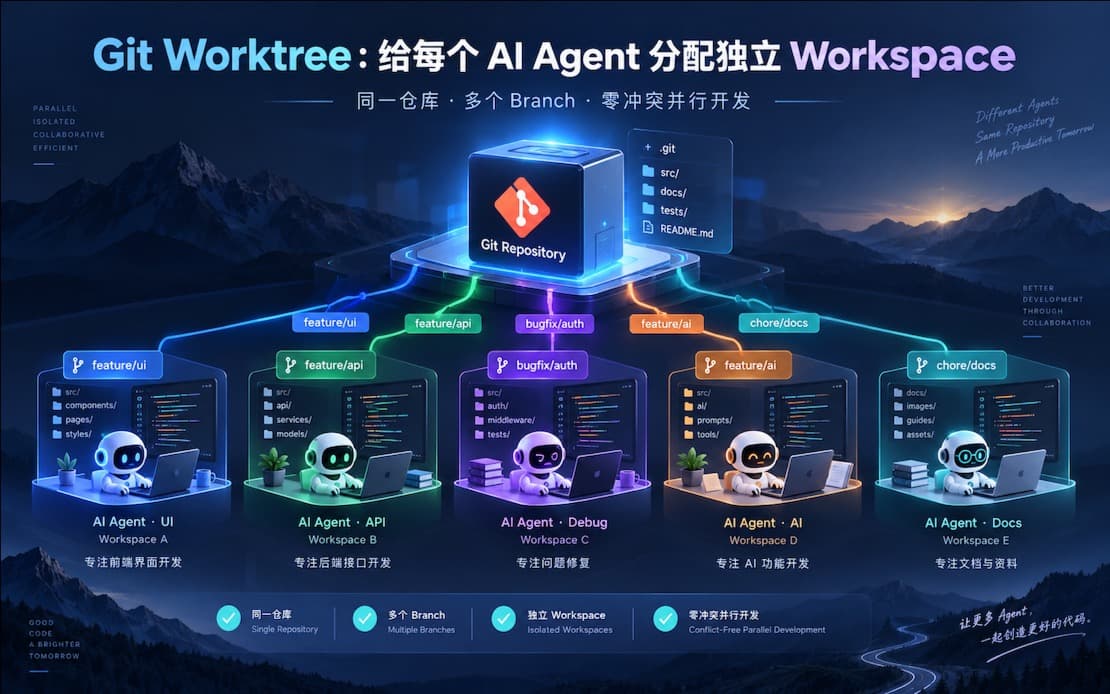
Git Worktree: The Lowest-Cost Solution for Multiple AI Agents to Develop the Same Project in Parallel
Use Git Worktree to assign an independent workspace to each AI Agent, enabling parallel development on the same repository with multiple branches and zero conflicts. This article introduces the complete multi-AI parallel workflow: worktree initialization, task decomposition principles, pitfalls and lessons learned, and scenarios where this approach is not suitable.
Introduction
Most people still use AI to write code in a serial mode: wait for one Agent to finish, review, then have the next one make changes. This is equivalent to treating AI like a single-core CPU.
Here is the conclusion upfront: Use Git Worktree to give each AI an independent workspace, run multiple Agents in parallel without interfering with each other, and finally merge them together. This is currently the lowest-cost and simplest multi-AI parallel workflow—no extra tools required, natively supported by Git, and ready to use today.
This article covers: the complete workflow, task splitting principles, three common pitfalls to avoid, and scenarios where this approach actually becomes a burden.
Why Not Just Open Multiple Terminals?
For many people, their first reaction is: open multiple terminals, run a Claude Code instance in each, pointing to the same project directory.
This causes problems.
File Contention: Two Agents modify src/api/user.ts at the same time. The latter write directly overwrites the former's changes without any conflict notification.
Intermediate State Pollution: Agent A half-modifies schema.prisma, Agent B reads the broken schema, and then continues generating code based on that error. The cost of debugging this type of issue is extremely high because the error appears in Agent B's output, but the root cause lies in Agent A.
Toolchain Conflicts: Running pnpm install twice simultaneously will corrupt node_modules. The TypeScript language server is occupied by two processes at the same time, causing all kinds of strange type errors to appear randomly.
The fundamental reason is: The same working directory is essentially shared state and is not concurrency-safe.
The Essence of Git Worktree
Created
Updated
Word count
1573
Reading time
8 minutes
Views
...
Git Worktree solves precisely this problem.
In a single sentence: A single .git repository mounts multiple independent file directories, with each directory corresponding to an independent branch.
my-project/           ← Main worktree (main branch)
  .git/               ← The only object store, shared by all worktrees
  src/
  ...

../my-project-auth/   ← Worktree 1 (feat/auth branch)
  src/
  ...

../my-project-dash/   ← Worktree 2 (feat/dashboard branch)
  src/
  ...
The fundamental difference from git clone: clone copies the entire .git directory, doubling disk usage, and branches are independent with no awareness of each other. Worktree shares the same object store, making disk overhead almost negligible (only the files in the working directory are independent), and the branch states of all worktrees are completely visible to the main repository.
Core Commands Cheat Sheet
bash
# Create a new worktree and a new branch simultaneously
git worktree add ../my-project-auth -b feat/auth

# Create a new worktree based on an existing branch
git worktree add ../my-project-auth feat/auth

# List all worktrees
git worktree list

# Remove a worktree (exit the directory first)
git worktree remove ../my-project-auth

# Force remove (when there are uncommitted changes)
git worktree remove --force ../my-project-auth
Just these few commands, zero learning curve.
Hands-On: Complete Workflow for 3 AIs Developing in Parallel
Scenario
A full-stack project (Next.js + Go + PostgreSQL) requires advancing three modules simultaneously: User Authentication, Dashboard, and API Refactoring.
Step 1: Task Splitting—Cut by Module Boundaries, Not by Files
This step is the key to the success or failure of the entire approach, and it is far more important than Git commands.
Correct Splitting:
Agent 1 → feat/auth: Login, registration, JWT, session management. Boundary: Do not touch dashboard components, do not change API routing structures.
Agent 2 → feat/dashboard: Chart components, data display, filtering logic. Boundary: Only consume APIs, do not change API implementations.
Agent 3 → feat/api-refactor: Unified error handling, response format, middleware layer. Boundary: Do not change business logic, only modify the API layer structure.
Incorrect Splitting:
"Agent 1 edits the first three files, Agent 2 edits the last three files" → File-level splitting lacks semantic boundaries, making it very easy for Agents to cross boundaries.
Having two agents modify package.json at the same time → Inevitable conflicts, do not do this.
Step 3: Independent Initialization for Each Worktree
Each worktree has its own independent node_modules, so dependencies need to be installed separately:
bash
cd ../my-project-auth && pnpm install
cd ../my-project-dash && pnpm install
cd ../my-project-api && pnpm install
.env files are not tracked by Git and require manual handling:
bash
# Option A: Direct copycp my-project/.env my-project-auth/.env
cp my-project/.env my-project-dash/.env
cp my-project/.env my-project-api/.env
# Option B: Symlink (modify once and it applies everywhere, recommended)ln -s $(pwd)/my-project/.env my-project-auth/.env
ln -s $(pwd)/my-project/.env my-project-dash/.env
ln -s $(pwd)/my-project/.env my-project-api/.env
Step 4: Launch Multiple AI Agent Instances
Manage multiple sessions using tmux (if you don't use tmux, opening multiple terminal windows is fine):
bash
# Create new sessions and launch Claude Code
tmux new-session -d -s agent-auth -c ~/my-project-auth
tmux send-keys -t agent-auth "claude" Enter

tmux new-session -d -s agent-dash -c ~/my-project-dash
tmux send-keys -t agent-dash "claude" Enter

tmux new-session -d -s agent-api -c ~/my-project-api
tmux send-keys -t agent-api "claude" Enter
The initial prompt given to each Agent must clearly define boundaries:
# Prompt for Agent 1
You are responsible for implementing the user authentication module (feat/auth branch).
Scope: All files under the src/auth/ directory, plus src/middleware/auth.ts.
Do not modify route files outside of src/dashboard/ and src/api/.
Priorities: JWT login, registration, and token refresh.
The clearer the boundaries, the less likely the Agent is to tamper with other modules.
Step 5: Review & Merge
After each Agent finishes, push their respective branches and go through the standard PR workflow:
bash
# In the my-project-auth directory
git add -A && git commit -m "feat(auth): implement JWT login and register"
git push origin feat/auth
# Review and merge in the main project, resolving conflicts here collectivelycd my-project
git merge feat/auth
git merge feat/dashboard
git merge feat/api-refactor
Suggested merge order: Merge those with fewer dependencies first. API refactoring usually has the widest impact, so leave it for last, ensuring the first two merges have minimal conflicts.
Pitfall Log
Pitfall 1: Shared Files Cannot Be Modified Concurrently
Global configuration files like package.json, prisma/schema.prisma, tsconfig.json, and tailwind.config.ts will inevitably conflict during merging if modified by two Agents simultaneously, and these conflicts are hard to resolve automatically.
Handling approach: Isolate modifications to such files, make the changes on the main branch first, and then git rebase main into each feature branch. Do not let Agents modify them directly.
bash
# Update dependencies centrally on the main branch
git checkout main
pnpm add some-new-package
git commit -m "chore: add some-new-package"# Pull updates via rebase in each worktreecd ../my-project-auth && git rebase main
cd ../my-project-dash && git rebase main
Pitfall 2: Agents Will Cross Boundaries When Context Is Insufficient
When an Agent encounters a problem within its own module, and the solution requires modifying a file in another module, it will modify it directly—because the file exists and it can see it.
This is not a bug; the Agent is "solving the problem." The issue lies in the fact that the boundary constraints in the prompt are not strict enough.
Solution: Add this rule to the prompt:
If you find that you need to modify files outside your boundaries to complete the task,
stop and tell me which specific file and what changes are needed.
Wait for my confirmation before proceeding. Do not modify them directly.
Pitfall 3: Port Conflicts
Each worktree is a complete project. If they all run pnpm dev, they will all compete for port 3000 by default.
bash
# package.json for my-project-auth"dev": "next dev -p 3001"# package.json for my-project-dash"dev": "next dev -p 3002"
Alternatively, manage this uniformly using environment variables by configuring different ports in their respective .env.local files.
When NOT to Use This Approach
Strong sequential dependencies between tasks: Agent 2's input depends on Agent 1's output, leaving no room for parallelism. Forcing parallelism will only cause Agent 2 to work on top of errors. Honestly stick to serial execution.
Poor project modularity: Global states, God objects, and circular dependencies are everywhere, with no clear module boundaries. In such projects, let alone multiple AIs, even a single Agent will mess things up as it modifies the code. Refactor first, then parallelize.
The task itself is very small: The entire task can be completed by a single Agent within an hour. Parallelism is unnecessary, and introducing multiple worktrees only increases the cognitive load of merging.
You are a solo developer without CI: Without automated tests as a safety net, if 3 Agents modify code in parallel, who guarantees there are no regressions after the merge? At a minimum, you need basic type checking and linting running in CI.
Conclusion
Git Worktree is a severely underrated native Git feature. Using it for multi-AI parallel development requires no extra tool dependencies, has a learning curve close to zero, and can be started today.
The core judgment: The bottleneck of parallel AI development is not the tool, but your ability to decompose tasks. Worktree simply unlocks the possibility of concurrency; whether it can actually run smoothly without interfering with one another depends on how clearly you define the boundaries in Step 1.
Actionable Next Steps:
bash
# 1. Try creating your first worktree in an existing project
git worktree add ../my-project-experiment -b feat/experiment
# 2. Go in and run an AI Agentcd ../my-project-experiment && claude
# 3. Clean up after completion
git worktree remove ../my-project-experiment
Start with one worktree and experience the isolation effect. Once you get it working, scale up to 2 or 3. Don't jump straight into running 5 Agents in parallel—that's not boosting efficiency, that's creating chaos for yourself.