Debian 13 Trixie Upgrade and New Features Introduction
Record of the upgrade process from Debian 12 to Debian 13 Trixie, with a detailed introduction to the main changes and highlight features brought by this version update.
Created
Updated
Word count
866
Reading time
4 minutes
I. Preparations Before Upgrade
Backup Important Data
Before upgrading, be sure to back up all important files, especially /home and configuration files. Also, export a list of installed software using dpkg --get-selections for easier restoration. Refer to Debian's official recommendation: Back up removable media and disconnect it.
Confirm Supported Environment
Non-physical servers, especially VPS using OpenVZ 6 or certain LXC architectures, may not support upgrading due to the lack of an independent kernel.
If your system uses root filesystem encryption, ensure cryptsetup-initramfs is marked as manual to prevent accidental removal.
Check Disk Space
At least 5 GB of free space is required to prevent system anomalies caused by insufficient space during the upgrade.
Recommended Test Upgrade Process (Optional)
You can simulate the upgrade in a virtual environment using a rescue image and QEMU. Verify that everything is correct before proceeding with the official upgrade.
If the kernel has been updated, it is recommended to reboot: reboot.
III. Update APT Sources to Trixie
Replace bookworm with :
Views
...
trixie
bash
sed -i 's/bookworm/trixie/g' /etc/apt/sources.list
sed -i 's/bookworm/trixie/g' /etc/apt/sources.list.d/*.list
sed -i 's/bookworm/trixie/g' /etc/apt/sources.list.d/*.sources
If your system supports the new DEB822 format, you can delete the old sources.list, keeping /etc/apt/sources.list.d/debian.sources, or use the command to convert:
bash
apt modernize-sources
For users in China, you can replace the sources with a domestic mirror (e.g., Tsinghua): mirrors.tuna.tsinghua.edu.cn.
IV. Phased System Upgrade
Update Package List and Perform a "Minimal Upgrade":
bash
apt update
apt upgrade --without-new-pkgs
Perform a Full Upgrade:
bash
apt full-upgrade
During this process, you may be prompted to restart services or update configuration files. It is recommended to keep your existing configurations (press Enter by default).
Clean Up Unused Software and Data:
bash
apt autoclean
apt autoremove -y
V. Reboot and Verify Successful Upgrade
bash
reboot
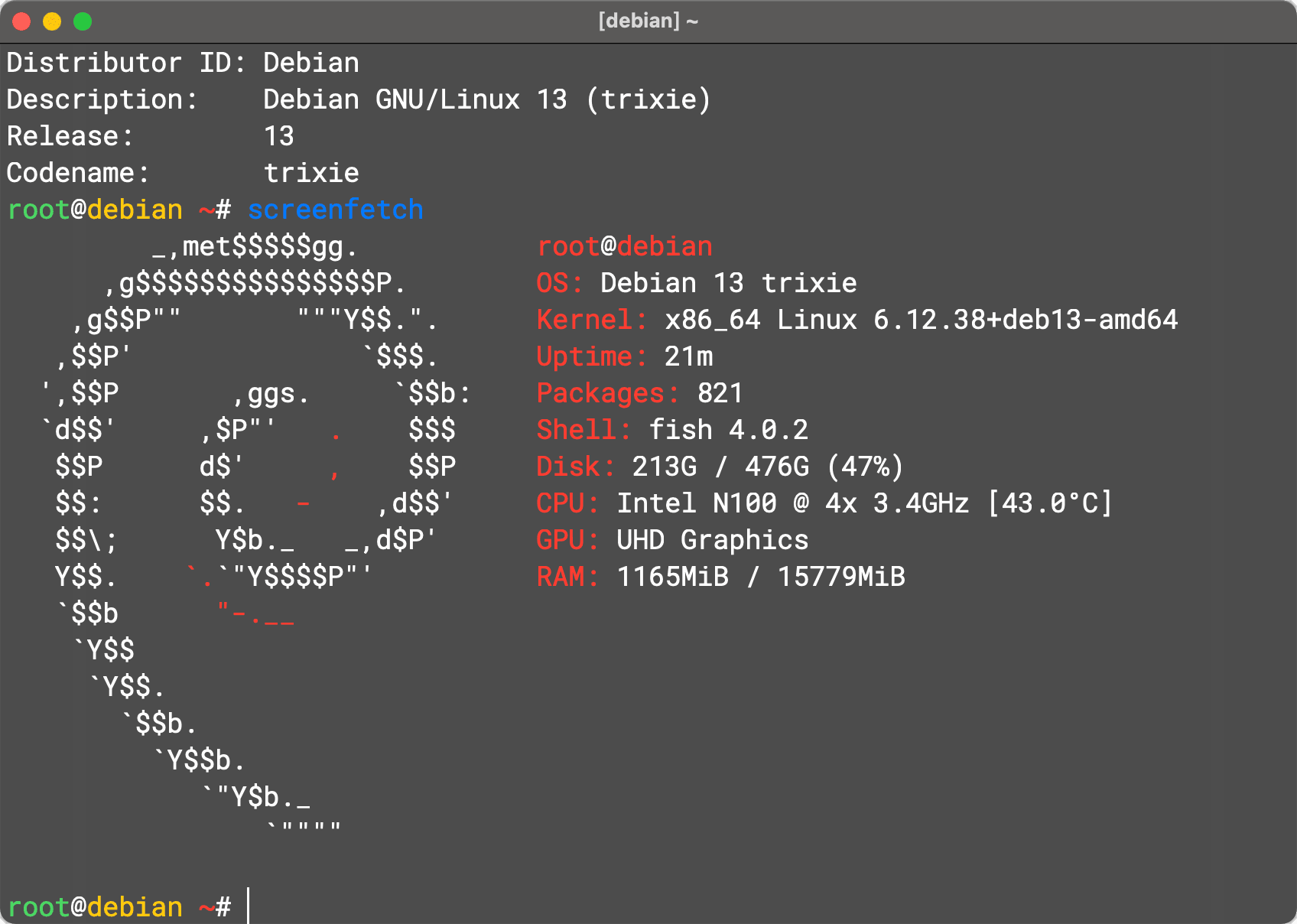
After the upgrade is complete, you can use the following commands to confirm the version:
bash
cat /etc/debian_version
lsb_release -a
uname -a
This should display Debian 13 (Trixie) information.
Preview screenshot (using screenfetch command)
VI. (Optional) Further Optimization
Use apt modernize-sources to convert to DEB822 format, improving the clarity of source configuration structure.
Check for any remaining bookmarks or third-party source configurations that have not been updated to ensure a clean system.
Upgrade Steps Overview Table
Stage
Operation Summary
1⃣
Back up important data and system status
2⃣
Update system and clean old software
3⃣
Modify APT sources to trixie
4⃣
Execute minimal upgrade → full upgrade
5⃣
Reboot the system
6⃣
Verify upgrade results (version, kernel)
VII. Debian 13 (Trixie) Key New Feature Highlights
Upgrading to Debian 13 brings not only a new version but also many practical functions and modern improvements. Here are some highlights worth noting:
1. Architecture and Kernel
Official support for the RISC-V 64-bit architecture (riscv64) is added, marking its formal inclusion in Debian's support system for the first time.
Features the Linux 6.12 LTS kernel, offering long-term support and better hardware compatibility.
2. Enhanced Security Protection
Introduction of ROP / COP / JOP attack defense mechanisms for amd64 and arm64 platforms:
These features will be automatically enabled if the processor supports them.
3. Boot and Network Support
Supports HTTP Boot to install images, compatible with UEFI and U-Boot firmware.
4. Multimedia and Input Experience Improvements
GNOME Image Viewer adds image editing capabilities and experimental support for RAW image file formats.
Qt WebEngine browsers (e.g., Falkon, Privacy Browser) now support spell checking (using Hunspell dictionaries), employing the BDIC binary format.
5. System Compatibility and Modern Architecture Improvements
Other architectures (except i386) have transitioned to using the 64-bit time_t ABI, completely resolving the Year 2038 problem.
The Apt tool is upgraded to APT 3.0, bringing a new colored progress bar interface, more intelligent dependency resolution (solver-3), more secure cryptographic support, and Unicode progress bars.
6. Network Tools and Build Improvements
curl supports the HTTP/3 protocol and includes the wcurl download tool as an alternative to wget.
Debian has made significant progress in Reproducible Builds, adding debian-repro-status and rebuilderd packages to facilitate users in verifying the reproducible build status of installed packages.
7. Desktop Environment Updates
Provides updated versions of mainstream desktop environments such as KDE Plasma 6, GNOME 48, Cinnamon 6.4, LXQt 2.1/2.2, Xfce 4.20, and MATE 1.26.1, offering more choices and modern experiences.
8. Installation and Pure Blends Optimization
The installer defaults to GB for partition units and automatically disables cdrom sources for non-CD installation media; enhances speech synthesis hardware support; supports system rescue from btrfs subvolumes, and Secure Boot support under systemd-boot.
Provides Debian Pure Blends micro-systems (e.g., Debian Junior, Science, FreedomBox) options directly within the installation process.