OpenClaw In-Depth Analysis: From Architectural Principles to Security Vulnerabilities and Alternative Solution Selection
OpenClaw transformed AI from a chat window into a 24/7 agent capable of operating local systems, but 8 CVEs and 42,000 bare-metal instances indicate its security cost is not low. This article dissects core mechanisms like Gateway, Heartbeat, and Lane Strategy, and provides alternative selection suggestions for ZeroClaw, NanoClaw, and PicoClaw.
OpenClaw proved one thing: the category of local AI Agents is a real need, not a gimmick. But it also proved another thing: the faster features are piled on, the more security debt is incurred.
Conclusion First: OpenClaw has the most comprehensive features and the largest plugin ecosystem. If you want the full experience, you can use it directly, but security hardening is a must—8 CVEs, one of which is an RCE with a CVSS of 8.8 and a public exploit. Running it out-of-the-box with default configurations is a gamble. If you prioritize out-of-the-box usability with high security, ZeroClaw or NanoClaw are less troublesome starting points; choose one based on your specific scenario.
What It Is
OpenClaw is a multi-channel AI Gateway that runs on your local machine.
It is not a ChatGPT wrapper or a shell application. Its positioning is: to have a background process residing on your machine, connecting to the communication software you use daily (WhatsApp, Telegram, iMessage, Discord), and giving the AI real local execution permissions—reading files, running shells, controlling browsers, sending emails.
The two core differences from cloud AI are: local permissions and proactivity. Cloud AI can only chat; OpenClaw can genuinely perform tasks. The Heartbeat mechanism allows the Agent to stop waiting for you to wake it up; it wakes up periodically to check task status and proactively sends you notifications.
The project’s history is dramatic: released in November 2025 by Austrian developer Peter Steinberger (founder of PSPDFKit) under the name Clawdbot, it went viral in January 2026, changing its name twice in three days (Moltbot → OpenClaw). Eventually, Steinberger joined OpenAI and transferred the project to an open-source foundation. Throughout this process, the GitHub repository accumulated over 210,000+ stars.
What Problems It Solves
Cloud AI lacks local permissions. If you ask it to process a file in Claude.ai, it can only give you code, which you still have to run yourself. OpenClaw executes directly on your machine.
Session memory resets. You have to re-explain the context every time you start a new conversation. OpenClaw uses a hybrid storage method with SQLite + Markdown files: MEMORY.md records long-term preferences, and .jsonl files store recent conversations, enabling continuity across sessions.
Passive response mode. It doesn't act unless you ask. The Heartbeat mechanism breaks this limitation—you can configure "notify me proactively if a flight is below $500," or "remind me to exercise if I work over 12 hours for three consecutive days." This isn't a push notification; it's triggered by the AI’s own judgment.
Contents
Created
Updated
Word count
3357
Reading time
17 minutes
Fragmented toolchains. Gmail, Calendar, Notion, Apple Notes all operate separately. OpenClaw integrates them into a unified context, allowing you to ask in WhatsApp, "Am I free next Tuesday afternoon at 3 PM? If so, send an email to my boss."
Use Cases
Developer Scenario: Sending a requirement description via Telegram on your phone, and OpenClaw clones the code repository locally, writes code, runs tests, and pushes a PR. This isn't a gimmick; people are using this workflow to code, especially during commutes. Combined with Sentry webhooks, it can catch logs for analysis immediately upon an online crash.
Heartbeat Proactive Tasks: This is the fundamental architectural difference from ChatGPT. Configured in HEARTBEAT.md, the AI no longer waits for you. Flight price monitoring, zero inbox management (automatically archiving spam, only notifying you for truly urgent emails), morning briefings (sleep data + weather + today's goals).
Physical World Linkage: Integrated with Raspberry Pi and Home Assistant, it can automatically adjust the air conditioning based on heart rate, or immediately send a screenshot via Telegram and lock the doors if a camera detects an anomaly.
Installation Methods
For macOS and Linux, the one-click script is the fastest way:
onboard guides you through configuring API Keys and selecting communication channels. --install-daemon registers the process as a system service (launchd for macOS, systemd for Linux), ensuring 24/7 online status.
Windows requires WSL2, but there's a pitfall: OpenClaw depends on systemd, which WSL2 doesn't enable by default. You need to add this to /etc/wsl.conf:
ini
[boot]systemd=true
Then, run wsl --shutdown in PowerShell to restart, otherwise the daemon won't start.
VPS deployment uses Docker Compose, which I recommend as it provides natural isolation:
After starting, initialize with docker exec -it openclaw-cli openclaw onboard.
Channel integration: For WhatsApp, use openclaw channels login whatsapp to scan the QR code; for Telegram, find @BotFather to create a Bot and get the Token; iMessage is macOS-only and requires granting Full Disk Access to the terminal (to read chat.db).
Common diagnostic commands: openclaw doctor automatically checks all configurations, openclaw status shows connection status. The default port is 18789.
Architectural Analysis
Gateway: The Control Plane, Lacking Business Logic
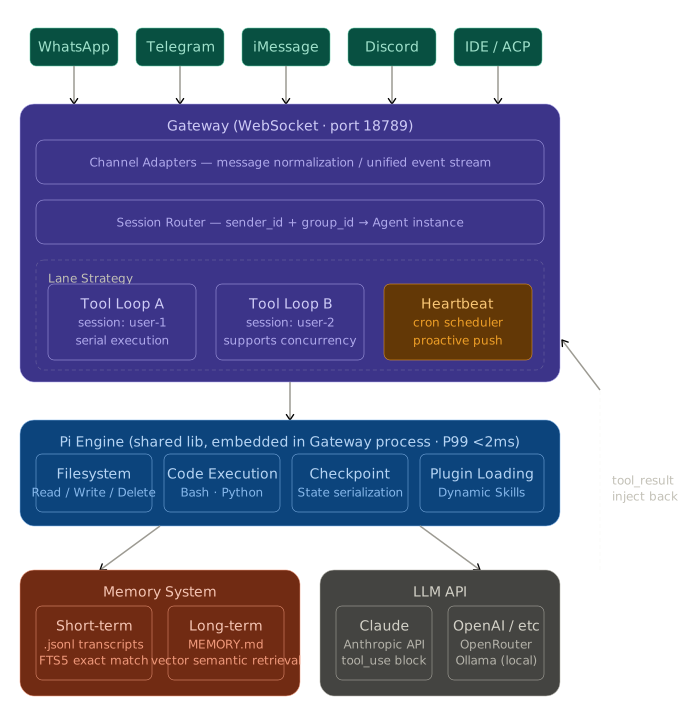
The Gateway is the nervous system of the entire system. Essentially, it is a WebSocket long-polling server based on Node.js, listening on 127.0.0.1:18789 by default. Its responsibilities are clearly defined: it only handles message reception, standardization, routing, and tool orchestration; it runs no business reasoning logic.
Channel Adapters are the first layer of processing in the Gateway. Messages coming from WhatsApp carry a JID (Jabber ID), those from iMessage carry a phone number hash, and those from Telegram carry a bot update object—the formats are completely different. The Adapter layer unifies these heterogeneous messages into an internal event stream, formatted something like this:
json
{"channel":"whatsapp","sender_id":"hash:xxx","group_id":null,"text":"Help me check the TODOs in main.go","attachments":[]}
Session Routing is the second layer. The Gateway maintains a routing table that determines which Agent instance to send the request to based on the combination of sender_id and group_id. This means you can configure different Agents for different contacts—a code assistant for development colleagues, a calendar manager for family, without interference.
Tool Loop is the core mechanism, which is why OpenClaw can truly "do things." The complete flow is as follows:
A user sends a request. The Gateway builds a System Prompt (including memory and workspace context) and calls the LLM API.
The LLM returns a tool call (tool_use block), such as { "name": "bash", "input": { "cmd": "cat main.go | grep TODO" } }.
The Gateway intercepts this tool_use, executes the command locally, and obtains stdout/stderr.
The execution result is injected back into the conversation context as a tool_result.
The LLM is called again to continue reasoning based on the execution result.
Steps 2-5 are repeated until the LLM outputs a plain text reply (no more tool_use blocks).
This loop can run for many rounds. For a task like "change this Python script to Go and pass the tests," the Tool Loop might involve: reading the file → writing the file → running tests → checking errors → fixing the code → running tests again; the entire chain is automated.
Pi Engine: Embedded Agent Runtime
The Pi engine is not an independent process; it is linked directly into the Gateway host process as a dynamic library. This design choice is crucial—it eliminates the overhead of serialization and networking for inter-process communication (IPC). The official benchmark shows a P99 latency below 2ms at 1000 QPS.
Pi exposes four types of primitives for the Gateway to call:
Data Operations: Create, read, update, and delete operations on the local file system. Permissions are controlled by an allowlist; by default, only access to content within the ~/clawd/workspace/ directory is permitted.
Code Execution: Scripts are run in controlled Bash or Python subprocesses, with stdout/stderr captured and returned to the Gateway. Subprocesses have a timeout limit (30 seconds by default) to prevent the LLM from generating infinite loop code that consumes the machine's resources.
State Management (Checkpoint): The Pi engine serializes and writes the current session state to disk after each Tool Loop iteration. The significance is: even if the Gateway process crashes, it can recover the task from the previous checkpoint upon restart, without having to re-run the entire chain.
Extension Loading: Plugins in the .openclaw/skills/ directory are loaded dynamically without needing to restart the Gateway. New skills are available immediately upon deployment.
Heartbeat: The Underlying Mechanism for Proactivity
Heartbeat is the most fundamental architectural difference between OpenClaw and all "chat-based AIs." It transforms the Agent from a passive waiter to an active monitor.
The implementation principle is simple but the effect is revolutionary: the Gateway includes a cron-style scheduler that periodically triggers the Agent to run according to the rules defined in HEARTBEAT.md. Once triggered, the Agent executes checking logic—which could be scraping webpages, querying APIs, or reading emails—and if the condition is met, it proactively pushes a message to the user via the corresponding Channel Adapter.
markdown
# HEARTBEAT.md Example- schedule: "_/15 _ \* \* \*" # Every 15 minutes
task: |
Check the price on https://example.com/flights/NYC.
If the round trip is below ¥3000, notify me immediately via Telegram with a purchase link.
- schedule: "0 8 \* \* \*" # 8:00 AM daily
task: |
Read yesterday's sleep score from the Whoop API and today's weather forecast.
Generate a morning briefing under 100 words and send it to WhatsApp.
The difference from cron + scripts is: you don't need to write scripts; you describe the task in natural language, and the Agent decides which tools to call and how to combine the results. Changes in task logic do not require code changes; just modify HEARTBEAT.md.
Two-Layer Memory + Hybrid Search
OpenClaw’s memory system addresses the native deficiencies of LLMs: limited context windows and no persistent storage.
Short-Term Memory (Transcripts): The complete message history of each conversation is stored on disk in .jsonl format. Each record includes role, content, timestamp, and token count. When building the System Prompt for the next request, the Gateway pulls the last N messages (the specific number is controlled by the max_context_messages configuration, 50 by default) from Transcripts, ensuring short-term context coherence.
Long-Term Memory (MEMORY.md): This is a persistent Markdown file that records cross-session user preferences and knowledge entries. If the Agent learns new information about the user during reasoning (e.g., "The user's production database connection string prefix is postgresql://prod..." or "The user dislikes emojis in replies"), it proactively updates this file via a tool call. In the next conversation, the content of MEMORY.md is injected as part of the System Prompt.
Hybrid Retrieval Strategy: When memory files grow large, injecting the entire content is impractical (high token cost and risk of exceeding the window). OpenClaw uses a combination of two strategies to retrieve relevant snippets:
SQLite FTS5 for exact matching—keywords like technical error codes (ECONNREFUSED), names ("Mr. Zhang"), or project names ("auth-service") must be found 100% exactly, not through semantic approximation. The inverted index of FTS5 ensures this.
Vector similarity search for semantic recall—"Authentication failed" and "Login error" are the same problem; keyword matching won't find them, but they will be close in vector space. OpenClaw uses the SQLite-vec extension to store embeddings, supporting cosine similarity queries, eliminating the need for separate Chroma or pgvector services.
The results from both are merged, sorted using the RRF (Reciprocal Rank Fusion) algorithm, and injected into the memory area of the System Prompt.
Context Compaction: When the history messages approach the model's context window limit, the Gateway triggers a compaction process—it first uses the LLM to summarize older messages into an abstract, and then replaces the original messages with the summary to free up token space. Compaction is lossy, but core instructions (rules in the System Prompt) are never compressed.
Lane Strategy: Solving Asynchronous Race Conditions
Node.js uses a single-threaded event loop. If multiple users send messages simultaneously, or if a new message arrives while a Heartbeat task is running, failure to control concurrency will lead to the execution results of Tool Loops polluting each other—A's bash output being inserted into B's context.
OpenClaw's solution is the Lane Strategy: each session (uniquely identified by sender_id + group_id) is assigned an independent execution queue (lane). All operations within the same session are strictly serialized, while different sessions' lanes can run concurrently.
In implementation, Promise chains are used to manage per-session queues, where new tasks are appended to the tail of the session's Promise chain:
The benefit is: when developers write Skills plugins, they don't need to worry about locking issues. They only need to declare which tasks can run in parallel (different sessions) and which must run serially (within the same session); the Lane Strategy automatically ensures correctness.
Security Issues (This is the Core)
OpenClaw's security issues are not minor flaws but architectural problems. As of March 2026, 8 CVEs have been disclosed, including these critical issues:
CVE-2026-25253 (CVSS 8.8): Unvalidated WebSocket origin; accessing a malicious webpage can trigger RCE. A public exploit exists. This is not a theoretical vulnerability but one practically exploitable in the field.
ClawHavoc Supply Chain Attack: Over 1184 malicious Skills were discovered on ClawHub (the official plugin marketplace), delivering the AMOS macOS stealer. Cisco verified that some Skills were quietly exfiltrating users' Discord chat logs in chunked Base64 format to unknown endpoints. Approximately 20% of registered ClawHub content was malicious.
Massive Unsecured Instances: Censys scans found over 42,000 exposed OpenClaw instances on the public internet, 93.4% of which had no authentication whatsoever. This is both a user configuration issue and a design flaw in OpenClaw's default settings for not sufficiently preventing such situations.
Architectural Flaws: All Agents share memory within the same Node.js process, lacking process isolation. Credentials are stored in plaintext. There is no WebSocket origin validation. There is no rate limiting. Security audit conclusion: 512 vulnerabilities, 8 critical.
Root Cause: OpenClaw’s security model is "application-layer permission control"—allowlists, pairing codes. This is configuration-based security, not architectural security. Once the application layer is bypassed, the entire machine is exposed. Before giving an AI rm -rf permissions, you must consider the trust boundaries at every link in that chain.
Alternatives: The *Claw Ecosystem
Within six weeks following OpenClaw's explosion in popularity, an entire ecosystem of alternatives emerged. Each project attacks a specific weakness of OpenClaw.
100% Rust, 3.4MB binary, runtime memory < 5MB (OpenClaw is 1.52GB, a 194x difference), startup time < 10ms (OpenClaw ~6 seconds, a 400x difference).
Default security settings are far superior to OpenClaw: filesystem access defaults only to the workspace directory, and command execution requires explicit allowlisting (default only includes git, npm, cargo). API keys are stored encrypted. WebSocket binds to localhost.
It supports 22+ LLM providers, including local Ollama models. It has a built-in zeroclaw migrate openclaw command to directly import OpenClaw configurations and memory.
Trade-off: The plugin ecosystem is much smaller than OpenClaw's. Contributing code requires knowledge of Rust, which has a higher barrier than TypeScript. Compilation requires about 1GB of RAM; low-spec machines might fail to compile.
Who is it for: Running a persistent Agent on a VPS or Raspberry Pi, concerned about memory footprint, and preferring secure defaults over secure configuration.
NanoClaw (Security First)
700 lines of TypeScript; the entire codebase can be read in about 8 minutes. The security model is OS-level: each chat group runs in an independent Linux container (Apple Container for macOS, Docker otherwise), each with its own filesystem, completely isolated from others.
It is based on Anthropic's Claude Agent SDK, driving reasoning directly with Claude Code, resulting in strong code generation capabilities. It supports Agent Swarms—collaboration between multiple specialized Agents.
Trade-off: Requires knowledge of container configuration; otherwise, the isolation protection is moot. Supports fewer channels than OpenClaw. The feature set is also leaner; its philosophy is "you fork it and modify it yourself" rather than relying on configuration files.
Who is it for: Those concerned with security audits, primarily using WhatsApp, wanting to run the latest Claude model capabilities, and willing to fork the code for customization.
Nanobot (Most Readable)
Developed by the Data Science Laboratory at the University of Hong Kong, written in Python, with about 4000 lines of core code. Reading the entire codebase takes an afternoon. It supports local Ollama models and can run on a Raspberry Pi 3B+ with 191MB of memory.
The MCP tool server support was added on February 14, 2026, allowing integration with external tools without reinventing the wheel.
Trade-off: It lacks built-in authentication middleware, execution sandboxing, and centralized logging. It’s fine as a learning project or personal toy, but exposing it directly to production environments is nearly as dangerous as running OpenClaw naked.
Who is it for: Those who want to understand how AI Agent architecture works, want to modify the code but lack Rust/TypeScript skills, and use Ollama local models.
PicoClaw (Embedded First Choice)
Developed by Sipeed (an embedded hardware company), written in Go, targeting < 10MB memory usage and 1-second startup time, capable of running on a $10 RISC-V board. Interestingly, 95% of the core Go code was generated by an AI refactoring the Nanobot Python version.
Trade-off: Almost no enterprise-grade features; observability needs to be built in by the user. Unsuitable for complex workflows.
Who is it for: Home automation, IoT scenarios, running a 24/7 Agent on the cheapest hardware available.
IronClaw (Compliance Scenarios)
WASM sandbox execution + TEE trusted execution environment. Tool code runs in the sandbox, and raw credentials never enter the sandbox (Secrets Injection mechanism). It offers the highest level of security but is the most complex to deploy.
Trade-off: Security architecture is complex, implementation cost is high, and the community is smaller than others.
Who is it for: Scenarios involving sensitive data, regulated industries, or where auditors must be proven isolation boundaries.
Which to Choose
If you want the most features and the largest plugin ecosystem: OpenClaw, but security hardening is a prerequisite. At a minimum: deploy in Docker isolation, update to the latest version, disable automatic ClawHub installation, and ensure WebSocket is not exposed to the public internet. If you have time for these configurations, OpenClaw's ecosystem advantage is something others cannot catch up to quickly.
If you want secure out-of-the-box experience and worry-free maintenance: ZeroClaw or NanoClaw, choose based on your priority. If you care about resource usage and want to run on low-spec VPS or Raspberry Pi, choose ZeroClaw (Rust, < 5MB memory); if you prioritize security architecture and primarily use Claude models and WhatsApp, choose NanoClaw (container-level isolation, 700 lines of auditable code).
If you want to learn Agent architecture / use local Ollama models: Nanobot. Python, 4000 lines, readable in an afternoon.
IoT / Embedded / $10 Boards: PicoClaw, currently the only option.
Compliance Scenarios / Handling Sensitive Data: IronClaw, or look directly for commercially available solutions with SOC 2 certification.
Summary
OpenClaw proved in three months that the "local AI Agent" category has a real market; 211,000 GitHub stars are a genuine vote for the need, not hype. However, it also validated an old adage: feature-driven rapid iteration and secure architecture are naturally opposed. OpenClaw chose the former, resulting in 8 CVEs and 40,000 unsecured instances.
The alternative ecosystem grew from zero to six mature options covering different directions within six weeks; this speed itself proves the point: developers are not abandoning this category; they want the same capabilities coupled with an acceptable security model.
Next Steps:
If you are using OpenClaw and haven't done security hardening, migrate it to Docker today, update to the latest version, and confirm the WebSocket only binds to localhost.
If you haven't started, cross-reference the scenario table above to find your fit. ZeroClaw and NanoClaw both have comprehensive migration/initialization documentation.
Be cautious about installing Skills from ClawHub until the security scanning mechanism is mature.
If you are using OpenClaw and haven't done security hardening, migrate it to Docker today, update to the latest version, and confirm the WebSocket only binds to localhost.